
I built a BBS. An actual bulletin board system, the kind you'd have dialed into in 1993, except instead of a phone line it runs over Reticulum, the same off-grid mesh networking stack behind the NomadNet mirror of this site. No modem, no phone number, no internet required on either end once you're on the mesh. Just a terminal and a radio path.
This post is the whole thing, start to finish. How to get Reticulum running on Windows if you've never touched it, how to connect, what's actually running on the other end, and why I made the choices I made along the way. Screenshots are all real, pulled straight off my own terminal connected to my own board. I didn't mock any of this up.
Longtime readers will notice this isn't the first time I've covered a BBS on this site. Back in 2019 I ran Mystic BBS out of a VirtualBox VM, fought DOSEMU for weeks just to get Legend of the Red Dragon working, and never finished the post. This isn't a sequel to that. Different software, different network, different decade of my life. It's just the same itch, scratched properly this time.
Before you dive in: this is a work in progress, not a finished product. File downloads aren't fully working yet. The door games have a few hiccups too, the MUD especially, and Trade Wars 2002 has a display glitch I haven't run down. If you hit something broken, email me: zero@thinkleet.net.
What You're Actually Connecting To
Reticulum is a networking stack built for exactly this: places where the normal internet doesn't reach, or where you don't want it to. It runs over whatever transport is available, LoRa radio, packet radio, a plain TCP link, doesn't matter, and builds encrypted, addressable, routable connections on top. Everything is identified by cryptographic identity instead of an IP address. There's no DNS, no ISP, no central anything.
The BBS sits on top of that. It's ENiGMA½, a real, actively-maintained BBS engine, not a toy I wrote. Message boards, file areas, door games, the whole nostalgia stack, bridged onto Reticulum through a tool called rnsh, which does for Reticulum roughly what SSH does for the internet: opens a remote shell session over the network.
Getting Reticulum Running on Windows
If you're on Linux or Mac this is even easier and you probably already know how. Windows is the case worth walking through carefully, so that's what I'm doing.
First, Python. If you don't have it, grab it from python.org. Run the installer, and pay attention to one specific checkbox: Add python.exe to PATH. It's unchecked by default. Check it. If you skip this, nothing later in this guide works from the command line and you'll spend twenty minutes confused about why pip isn't a recognized command.
Once Python's installed, open PowerShell (search for it in the Start menu, regular user is fine, you don't need Administrator) and run:
pip install rns rnshrns is Reticulum itself. rnsh is the remote-shell tool that actually gets you into the BBS. Both are plain Python packages, no compiling, no drivers, no fuss.
Pointing It at the Network
Reticulum needs to know how to reach the wider mesh. Since you (probably) don't have your own LoRa radio sitting on this specific network, the practical path is a TCP interface pointed at a public gateway node that's already bridged in.
Reticulum's config file lives at %USERPROFILE%\.reticulum\config. It won't exist yet on a fresh install. Create the folder and file (Notepad is fine), and put this in it:
[reticulum]
  enable_transport = False
  share_instance = True

[interfaces]
  [[NEPAMesh Public Gateway]]
    type = TCPClientInterface
    interface_enabled = True
    target_host = reticulum.nepamesh.com
    target_port = 4242
That's it. Save it. You now have a path onto the same mesh this BBS lives on, from a machine that's never touched Reticulum before.
Connecting
One command, still in PowerShell:
rnsh c37c79c5e55506fe6f693481ee6f705cThat long string is the BBS's actual network address, a hash derived from its identity, not something I made up for readability. Reticulum addresses look like this. Get used to it.
First time connecting, you'll be asked to pick a handle. Do that, and you're in.
I'll be honest, I didn't have high hopes when I actually put this to the test. I plugged an RNode into my laptop, put the whole machine into airplane mode, WiFi off, cellular off, nothing, and left only the RNode as a way in or out. No internet path existed on that machine at all. I connected anyway. Announces showed up on NomadNet, the BBS let me in clean, no fallback route quietly saving me. I've built enough half-working things to expect a half-working thing. This wasn't one. The nostalgia hit somewhere I wasn't braced for either, that specific "wait, this actually works" feeling, the kind Faith No More named a whole song after. Epic, in the literal sense, not the internet-slang one.
Why No Login Screen
Notice there's no username, no password, no account creation form. That's deliberate, not a missing feature.
Your Reticulum identity, the same cryptographic identity your rnsh client already has, is your account key. The first time you connect, the BBS sees a Reticulum identity it's never seen before, silently creates an account tied to it, and asks you for one thing: a handle. Every time after that, connecting with the same identity just logs you in. No password to lose, no password to leak, nothing to phish. The security boundary is "do you control this Reticulum identity," full stop.
The handle prompt exists because the identity itself is an ugly hash, not something you want showing up as your name on every message you post. It's enforced unique across the board (I check on every new connection so nobody can squat someone else's name), but your actual account is still keyed to your identity underneath. Change your handle later from the user config menu if you want; your account doesn't move.
The Menu
Press ? at the main menu any time and you get this:
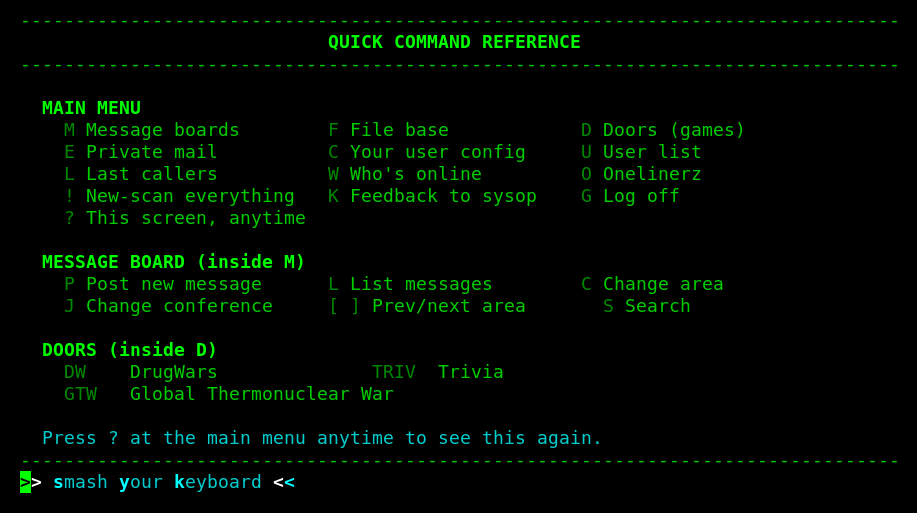
Everything's a single letter or short code typed at a prompt, then Enter. Old-school on purpose. If you've never used a BBS before, this is the whole interface: type a letter, get a menu, type another letter.
Message Boards
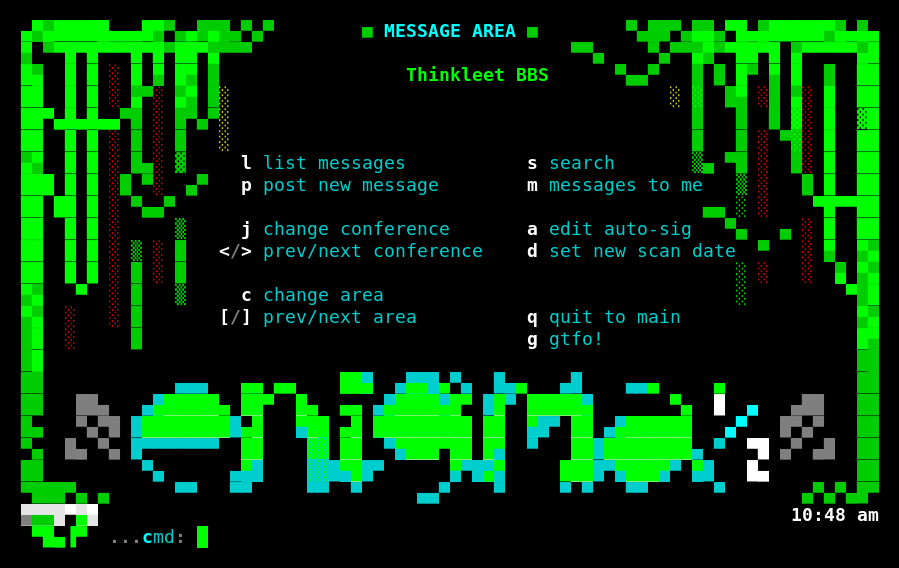
Four real topic areas: RF & Radio, Off-Grid & Meshtastic, Builds & Projects, and a general catch-all, plus a sysop announcements area. Each one already has a proper reference file stocked in it (not filler, actual public-domain Navy training manuals on RF theory and antenna design, plus real project documentation), so there's something to read even on day one.
File Base
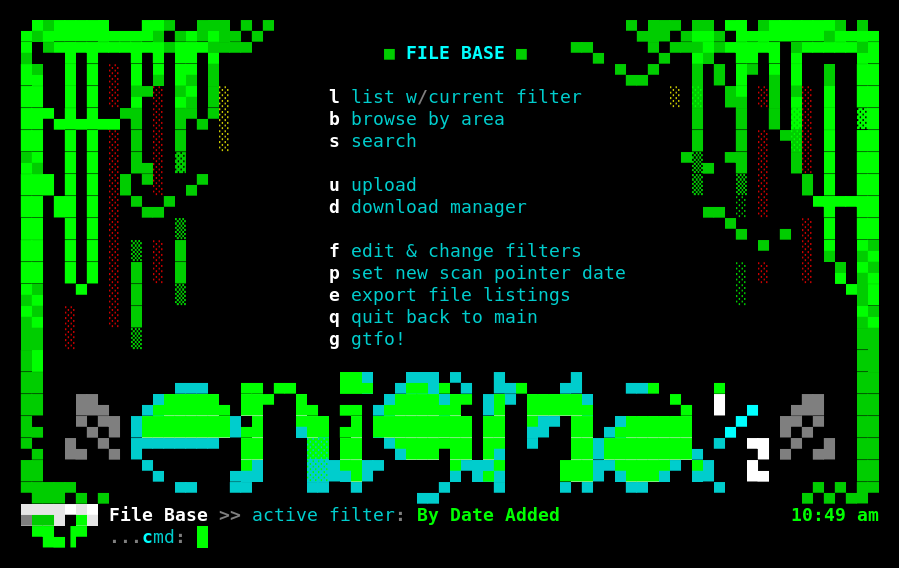
Real files, browsable and downloadable, organized the same way as the message boards. Downloading uses Zmodem, the actual file-transfer protocol BBSes have used since forever, which a plain PowerShell window doesn't speak. If you want to pull files down, the straightforward path is SyncTERM, a proper BBS terminal client that handles Zmodem automatically, run inside Windows Subsystem for Linux with rnsh feeding it the connection. It's an extra step, and I'm not going to pretend otherwise. Browsing and reading works fine from plain PowerShell; actually pulling a file down wants a real terminal.
Door Games
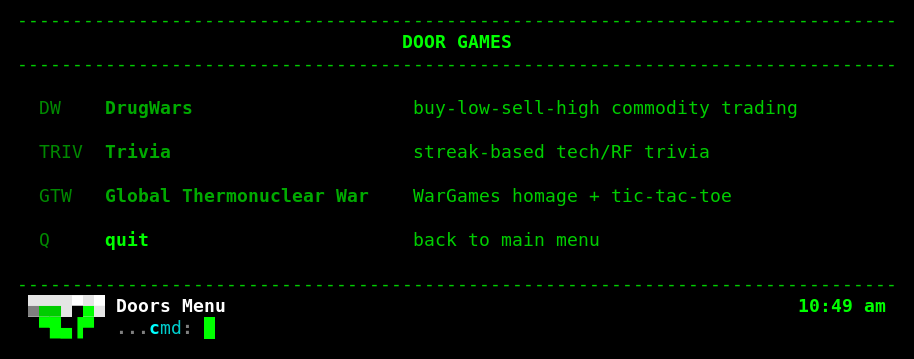
Three of them, and I built all three myself rather than pirating something. DrugWars is the classic buy-low-sell-high commodity loop, the one practically every BBS from this era had some version of. Trivia is streak-based tech and RF trivia, thirty questions I wrote covering everything from POCSAG to UART to WPA3. Global Thermonuclear War is a WarGames homage that ends, appropriately, in a real playable game of tic-tac-toe.
NEPAMesh's sister board runs a different lineup, including an actual unmodified 1990 DOS binary of Trade Wars 2002 running under a real x86 emulator baked into the BBS software itself. That one deserves its own post. This board stayed in Python because I wrote all three from scratch and didn't need to reach for anything heavier.
A Quirk Worth Knowing About
If your session drops for no reason while you're just sitting there reading, that's not the BBS. It's Reticulum itself. rns, the library rnsh and everything else here runs on, scales its own keepalive interval down based on how fast the link looks, and on a quick connection that can shrink all the way to five seconds. Pause too long without sending anything and your own client can decide the link's gone stale and hang up on itself, regardless of what's happening on this end.
I patched both BBS containers to raise that floor to sixty seconds, but that only fixes our half of the link. Yours is a one-line edit too, KEEPALIVE_MIN in Link.py, if you want to bother. Over an actual radio hop the round trip is slow enough that this mostly never comes up. It's the fast TCP gateway path, the one most people reading this are actually using, where it bites.
What's Actually Running Under This
Since I know someone's going to ask: this box also hosts NEPAMesh's own BBS as a fully separate instance, both bridged onto the same physical RNode radio through a shared Reticulum daemon, both reachable purely over the mesh with SSH bound to localhost only, no port ever exposed to the open internet. The only way in, for either board, is through Reticulum itself. That's not a cute detail, it's the actual security model: no password to brute-force because there's no password, no open port to scan because there's no open port.
If you've made it this far, you have everything you need. Install Python, pip install rns rnsh, drop the config, run rnsh c37c79c5e55506fe6f693481ee6f705c, pick a handle, and you're standing in the same lobby I am.